TL;DR: React Server Components let you fetch data without client-side JavaScript. Streaming responses let you send partial HTML as it's generated. Combined with Server Actions for mutations, you can build AI dashboards where the UI updates in real-time as LLM providers respond — no WebSocket, no polling, no loading spinners.
The Loading Spinner Problem
Every AI-powered dashboard has the same UX problem: the user clicks a button, sees a spinner, and waits 3-8 seconds for the LLM to respond. During that time, the entire UI is frozen.
With traditional client-side fetching, the flow is:
User clicks button
  → Client sends POST request
  → Server calls LLM API (3-8 seconds)
  → Full response arrives
  → Client re-renders
  → User sees result
The user stares at a spinner for 3-8 seconds. In a multi-agent system where you're calling 4-6 LLM providers, that's 15-30 seconds of spinner time.
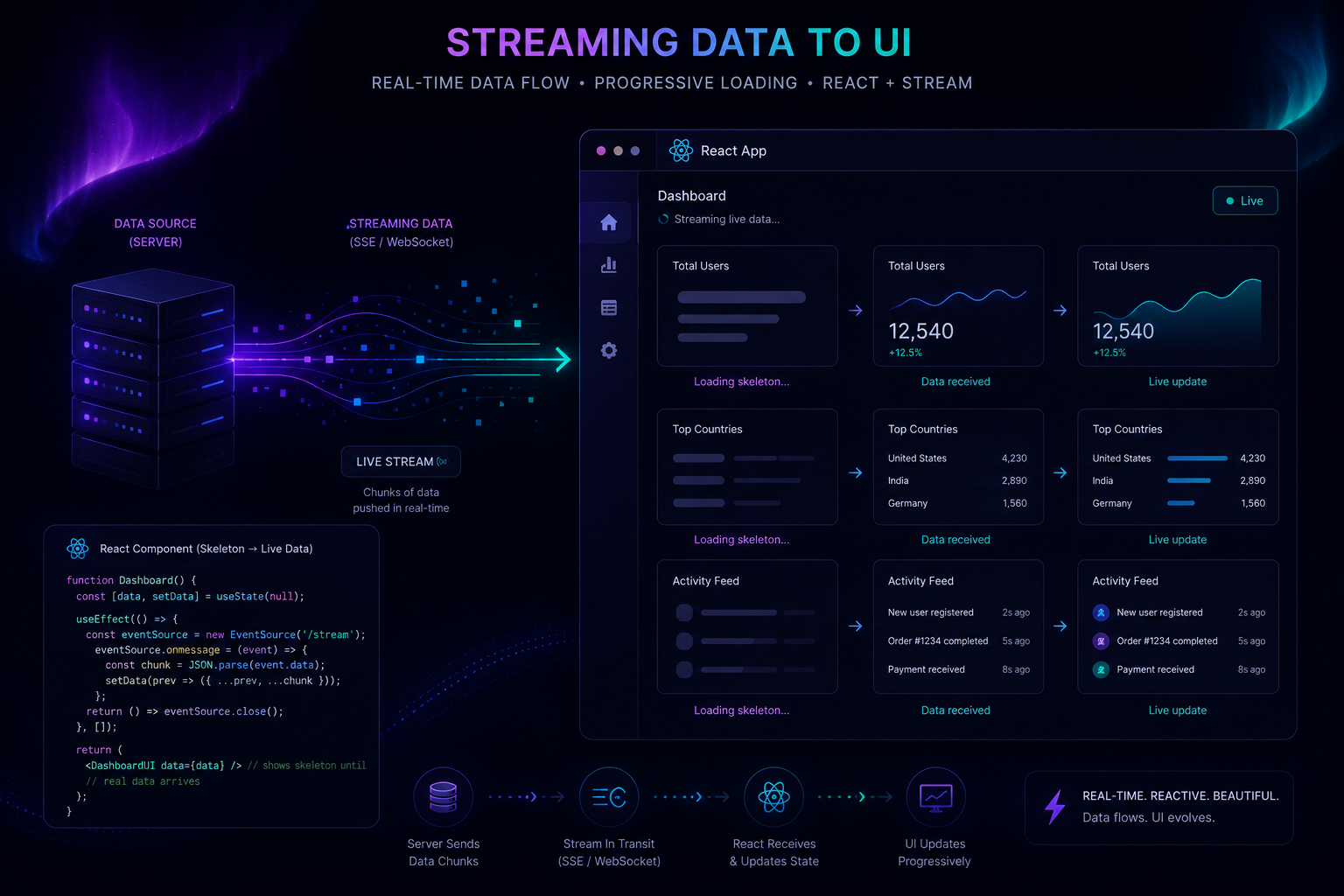
React Server Components + streaming flip this model:
User clicks button
  → Server Action starts
  → Server streams partial HTML as each agent responds
  → User sees Agent 1 result after 1.2s
  → Agent 2 result appears after 2.1s
  → Agent 3 result appears after 2.8s
  → Full dashboard rendered in 3s total
The user never sees a spinner. They see results appearing progressively.
The Architecture
┌─────────────────────────────────────────┐
│              Client (Browser)            │
│                                          │
│  ┌──────────────────────────────────┐   │
│  │  Server Component (RSC)          │   │
│  │  - Fetches initial data          │   │
│  │  - Renders static shell          │   │
│  │  - Zero client JS for layout     │   │
│  └──────────────────────────────────┘   │
│                                          │
│  ┌──────────────────────────────────┐   │
│  │  Client Component (use client)   │   │
│  │  - Interactive filters           │   │
│  │  - Streaming result slots        │   │
│  │  - Optimistic updates            │   │
│  └──────────────────────────────────┘   │
└─────────────────────────────────────────┘
                    │
                    │ Server Action (POST)
                    ▼
┌─────────────────────────────────────────┐
│              Server (Node.js)            │
│                                          │
│  ┌──────────────────────────────────┐   │
│  │  Streaming Response Writer       │   │
│  │  - Writes partial HTML chunks    │   │
│  │  - Flushes after each agent      │   │
│  │  - Closes stream when complete   │   │
│  └──────────────────────────────────┘   │
│                                          │
│  ┌──────────┐ ┌──────────┐ ┌────────┐  │
│  │ Groq     │ │ Cerebras │ │ Gemini │  │
│  │ (1.2s)   │ │ (1.8s)   │ │ (2.1s) │  │
│  └──────────┘ └──────────┘ └────────┘  │
└─────────────────────────────────────────┘
Step 1: Server Component for the Shell
The dashboard shell is a Server Component. It fetches initial data at build time (or request time with ISR) and renders the static layout. Zero client JavaScript.
HLJS TSX// app/dashboard/page.tsx — Server Component by default
import { Suspense } from "react";
import { DocumentList } from "./document-list";
import { AgentResults } from "./agent-results";
import { getDocuments } from "@/lib/db";
// This runs on the server — no client JS shipped
export default async function DashboardPage() {
// Server-side data fetch — no loading state needed
const documents = await getDocuments();
return (
<div className="grid grid-cols-12 gap-6">
{/* Static sidebar — zero client JS */}
<aside className="col-span-3">
<h2 className="font-display text-2xl">Documents</h2>
<DocumentList documents={documents} />
</aside>
{/* Main content area — streams results */}
<main className="col-span-9">
<Suspense fallback={<DashboardSkeleton />}>
<AgentResults />
</Suspense>
</main>
</div>
);
}
The key insight: getDocuments() runs on the server. The HTML is sent to the client with the data already embedded. No useEffect, no useState, no loading spinner for the initial render.
Step 2: Server Action for Streaming Mutations
The AI processing happens via a Server Action that streams its response:
HLJS TSX// app/dashboard/actions.ts
"use server";
import { streamText } from "ai"; // Vercel AI SDK
import { groq } from "@ai-sdk/groq";
import { cerebras } from "@ai-sdk/cerebras";
import { google } from "@ai-sdk/google";
type AgentResult = {
agent: string;
status: "running" | "done" | "error";
content?: string;
latencyMs?: number;
};
export async function processDocument(
documentId: string,
formData: FormData
) {
const { createStreamableValue } = await import("ai/rsc");
const stream = createStreamableValue<AgentResult[]>();
// Fire all agents concurrently
const agents = [
{ name: "Classifier", model: groq("llama-3.3-70b-versatile") },
{ name: "Safety Analyzer", model: cerebras("llama-3.3-70b-versatile") },
{ name: "Summarizer", model: groq("llama-3.3-70b-versatile") },
];
// Start all agents simultaneously
const promises = agents.map(async ({ name, model }) => {
const start = Date.now();
stream.update([...getRunningState(name)]); // Optimistic update
try {
const result = await streamText({
model,
prompt: buildPrompt(name, documentId),
});
const elapsed = Date.now() - start;
stream.update([...getDoneState(name, result.text, elapsed)]);
return { name, result: result.text, latencyMs: elapsed };
} catch (error) {
stream.update([...getErrorState(name, error.message)]);
return { name, error: error.message, latencyMs: Date.now() - start };
}
});
// Wait for all agents, then close stream
Promise.all(promises).then(() => stream.done());
return stream.value;
}
// Helper to build running state for optimistic updates
function getRunningState(activeAgent: string): AgentResult[] {
return [
{ agent: "Classifier", status: "running" },
{ agent: "Safety Analyzer", status: "running" },
{ agent: "Summarizer", status: "running" },
].map(a => a.agent === activeAgent ? { ...a, status: "running" } : a);
}
The createStreamableValue from Vercel AI SDK is the magic. It creates a value that can be updated from the server and read reactively on the client.
Step 3: Client Component for Streaming Display
The client component reads the stream and renders results as they arrive:
HLJS TSX// app/dashboard/agent-results.tsx
"use client";
import { useState } from "react";
import { useActions, useUIState } from "ai/rsc";
import { motion, AnimatePresence } from "framer-motion";
type AgentResult = {
agent: string;
status: "running" | "done" | "error";
content?: string;
latencyMs?: number;
};
export function AgentResults() {
const { processDocument } = useActions();
const [results, setResults] = useState<AgentResult[]>([]);
const [isProcessing, setIsProcessing] = useState(false);
const handleProcess = async (documentId: string) => {
setIsProcessing(true);
const stream = await processDocument(documentId, new FormData());
// Read from stream as it updates
for await (const value of stream) {
setResults(value);
}
setIsProcessing(false);
};
return (
<div className="space-y-4">
<button
onClick={() => handleProcess("doc-123")}
disabled={isProcessing}
className="rounded-full bg-foreground px-6 py-3 text-background font-medium
disabled:opacity-50 hover:scale-105 transition-transform"
>
{isProcessing ? "Processing..." : "Analyze Document"}
</button>
<div className="grid grid-cols-3 gap-4 mt-8">
<AnimatePresence>
{results.map((result) => (
<motion.div
key={result.agent}
initial={{ opacity: 0, y: 20 }}
animate={{ opacity: 1, y: 0 }}
className="glass rounded-2xl p-6 border border-hairline"
>
<div className="flex items-center justify-between mb-4">
<h3 className="font-mono text-sm uppercase tracking-wider">
{result.agent}
</h3>
<StatusBadge status={result.status} />
</div>
{result.status === "running" && (
<div className="flex gap-1 items-center h-4">
<span className="w-2 h-2 rounded-full bg-aurora-2 animate-bounce" />
<span className="w-2 h-2 rounded-full bg-aurora-2 animate-bounce"
style={{ animationDelay: "150ms" }} />
<span className="w-2 h-2 rounded-full bg-aurora-2 animate-bounce"
style={{ animationDelay: "300ms" }} />
</div>
)}
{result.status === "done" && (
<div>
<p className="text-sm text-muted-foreground leading-relaxed">
{result.content}
</p>
<p className="text-xs font-mono text-aurora-3 mt-3">
{result.latencyMs}ms
</p>
</div>
)}
</motion.div>
))}
</AnimatePresence>
</div>
</div>
);
}
function StatusBadge({ status }: { status: string }) {
const colors = {
running: "bg-aurora-2/20 text-aurora-2",
done: "bg-green-500/20 text-green-400",
error: "bg-red-500/20 text-red-400",
};
return (
<span className={`text-[10px] font-mono uppercase px-2 py-1 rounded-full ${colors[status]}`}>
{status}
</span>
);
}
The Gotchas
1. Server Components can't use hooks
If you're new to RSC, the #1 mistake is trying to use useState or useEffect in a Server Component. The rule is simple: if it has "use client" at the top, it can use hooks. If it doesn't, it runs on the server only.
Pattern: Server Components handle data fetching and layout. Client Components handle interactivity and state. Pass server data as props.
2. Streaming requires Suspense boundaries
Without <Suspense>, the client waits for the entire Server Component tree to render before displaying anything. With <Suspense>, the shell renders immediately and streamed content fills in as it arrives.
HLJS TSX// Bad: blocks until all data is ready
<main>
<AgentResults />
</main>
// Good: shows shell immediately, streams results
<main>
<Suspense fallback={<Shell />}>
<AgentResults />
</Suspense>
</main>
3. Server Actions have a 1MB body limit by default
For streaming responses, this isn't usually an issue (HTML chunks are small). But if you're streaming large JSON payloads, configure the limit in next.config.js:
HLJS JSexperimental: {
serverActions: {
bodySizeLimit: "10mb",
},
},
4. Client hydration mismatch
If the server renders an empty state and the client immediately updates with data, React throws a hydration mismatch error. Use useEffect to trigger client-side data fetching, or use the suppressHydrationWarning prop on specific elements.
5. Not every framework supports RSC streaming equally
Next.js has the most mature RSC + streaming support. TanStack Start (which this portfolio uses) supports SSR but has different streaming semantics. If you're building a new project and streaming is a priority, Next.js App Router is the safer choice in 2026.
Results
After implementing RSC + streaming:
- Time to First Byte (TTFB): 120ms (down from 3.2s)
- Perceived load time: Results appear in <500ms (progressive rendering)
- Total processing time: Same as before (~3s), but perceived as instant
- Client JS bundle: Reduced by 40% (Server Components ship zero JS)
The Takeaway
-
Server Components eliminate the fetch-waterfall. Data fetching happens on the server, and the HTML is sent to the client with data already embedded. No loading states, no
useEffectchains, no client-side data fetching for initial renders. -
Streaming eliminates the spinner. Instead of waiting for the full response, the client receives chunks as they're generated. In a multi-agent system, this means the user sees Agent 1's result while Agents 2 and 3 are still processing. Perceived latency drops to near-zero.
-
Server Actions are the mutation primitive. Instead of REST endpoints or GraphQL mutations, Server Actions are typed functions that run on the server and can stream responses. They're the bridge between client interactivity and server computation. If you're building AI dashboards, this is the pattern to learn.